Aggregating Data and Thinking in Pictures
Day 2 of the RI workshop, Summer 2023
FSU
Class Today
- Going over the HW
- Reinforcing what we’ve learned so far
- Different types of data
- Functions used to clean data
- How we might want to clean data
- Learning more advanced techniques for cleaning data
- grouping data using
group_by() - creating summary tables using
summarize()
- grouping data using
- Toying around with
ggplot()
HW Answers
library(tidyverse)

#load in the data
read_csv('class_toy_data.csv') -> data

#this is an easier way to accomplish what we need
#read_csv('class_toy_data.csv', skip = 1) -> data

#using rename instead
## first we remove the unnecessary row and variables
## then we use rename
data %>%
  slice(-1) %>%
  select(-c(x1,x11,x12,x13,x14)) %>%
  rename('age'     = x2,
         'gender'  = x3,
         'educ'    = x4,
         'income'  = x5,
         'app_rat' = x6,
         'pid'     = x7,
         'opp_tex' = x8,
         'gun_opp' = x9,
         'abo_opp' = x10) -> data

# now lets get the data formatted properly
data %>%
  mutate(age     = parse_number(age),
         income  = parse_number(income),
         app_rat = parse_number(app_rat),
         gun_opp = parse_number(gun_opp),
         abo_opp = parse_number(abo_opp)) -> data

# changing the negative value from approval to NA
data %>%
  mutate(app_rat = case_when(app_rat < 0 ~ NA_real_,
                             TRUE ~ app_rat)) -> data

# keeping only republicans
data %>%
  filter(pid == 'Republican') -> data

# saving the data
#write_csv(data, 'cutler_hw1_data')

# note that this could all technically be done in one big chunk
data %>%
  slice(-1) %>%
  select(-c(x1,x11,x12,x13,x14)) %>%
  rename('age'     = x2,
         'gender'  = x3,
         'educ'    = x4,
         'income'  = x5,
         'app_rat' = x6,
         'pid'     = x7,
         'opp_tex' = x8,
         'gun_opp' = x9,
         'abo_opp' = x10) %>%
  mutate(age     = parse_number(age),
         income  = parse_number(income),
         app_rat = parse_number(app_rat),
         gun_opp = parse_number(gun_opp),
         abo_opp = parse_number(abo_opp),
         app_rat = case_when(app_rat < 0 ~ NA_real_,
                             TRUE ~ app_rat)) %>%
  filter(pid == 'Republican')

#alternative ways to accomplish getting the data in the right format:
read_csv('class_toy_data.csv', skip = 1)

#or if we hadn't done that
data %>%
  mutate(across(c(age,income,app_rat,gun_opp,abo_opp), ~parse_number(.)))

#or we could even just
data %>%
  mutate(across(where(is.numeric), parse_number))
Brief review
What are the types of data we can encounter?
Show Answer
Numeric, string/character, factor, logical
What is an object in R and where are they shown?
Show Answer
Created data, can be either a vector or data frame; global environment
What is this
%>%called?Show Answer
A “Pipe”
What functions did we learn about last class to clean data?
Show Answer
mutate(),select(),slice(),filter(),parse_number()What functions can be used to rename variables?
Show Answer
rename(),clean_names()
Cleaning Data (cont.)
- The main movers for cleaning data are
mutate(),select(), andfilter() - Functions can be used within other functions, and
case_when()is very useful for shaping data when combined withmutate()
Cleaning Data Practice
library(tidyverse)

tibble("Full Name" = c("John Smith", "Jimmy Dean", "Robert Williams",
                       "Emily Davis", "Michael Brown"),
  "Political Affiliation" = c("Democratic", "Republican", NA, "Democratic",
                              "Libertarian"),
  "Represented State" = c("California", "Texas", "New York", NA, "Florida"),
  "Politician Age" = c(45, 65, 60, 41, 20),
  "Years Served" = c(6, NA, 2, 4, 12),
  "Votes Received" = c(24000, NA, 15000, 20000, 32000),
  "Legislation Passed" = c(12, 10, NA, 6, 15)) -> real_congress

real_congress
# A tibble: 5 × 7
`Full Name` `Political Affiliation` `Represented State` `Politician Age`
<chr> <chr> <chr> <dbl>
1 John Smith Democratic California 45
2 Jimmy Dean Republican Texas 65
3 Robert Williams <NA> New York 60
4 Emily Davis Democratic <NA> 41
5 Michael Brown Libertarian Florida 20
# ℹ 3 more variables: `Years Served` <dbl>, `Votes Received` <dbl>,
# `Legislation Passed` <dbl>Cleaning Data Practice
real_congress %>%
  janitor::clean_names() %>%
  rename('party' = political_affiliation,
         'state' = represented_state,
         'age' = politician_age) %>%
  filter(!is.na(party)) %>%
  mutate(age_cat = case_when(age < 30 ~ "<30",
                             (age >= 30 & age < 60) ~ "30-60",
                             age >= 60 ~ "60+")) %>%
  select(full_name,party,state,age_cat) -> real_congress_2

real_congress_2
# A tibble: 4 × 4
full_name party state age_cat
<chr> <chr> <chr> <chr>
1 John Smith Democratic California 30-60
2 Jimmy Dean Republican Texas 60+
3 Emily Davis Democratic <NA> 30-60
4 Michael Brown Libertarian Florida <30 Live Coding
Now that we’ve covered the basics again, let’s go through a problem together, download the Live Coding 1 data on the course materials page
Live Coding
As a group, we are going to:
- Rename all the variables
- Make Categorical Variables for age, experience, legislator’s activeness using committee membership and bill sponsorship, and votes (let’s assume each district has 60,000 voters)
- Remove NAs from any variables where there are NAs
- Make the data set only have their name, party, and the categorical variables from above
Aggregating Data
- In some applications, it is useful to get aggregate level information about our data
- We can use
group_by()andsummarize()to accomplish this group_byworks similarly torow_wise()from the homework, let’s start there
Aggregating Data
real_congress %>%
  janitor::clean_names() %>%
  rename('party' = political_affiliation,
         'state' = represented_state,
         'age' = politician_age) %>%
  filter(!is.na(party)) -> real_congress

real_congress
# A tibble: 4 × 7
full_name party state age years_served votes_received legislation_passed
<chr> <chr> <chr> <dbl> <dbl> <dbl> <dbl>
1 John Smith Demo… Cali… 45 6 24000 12
2 Jimmy Dean Repu… Texas 65 NA NA 10
3 Emily Davis Demo… <NA> 41 4 20000 6
4 Michael Brown Libe… Flor… 20 12 32000 15- What are some ways we’d be interested in grouping this data?
Aggregating Data
- Finding group numbers
# A tibble: 3 × 2
  party       sample
  <chr>        <int>
1 Democratic       2
2 Libertarian      1
3 Republican 1- What do you notice about the data produced here?
Aggregating Data
Aggregating Data
- We can also use this same style of coding to apply functions to categorical groups
Aggregating Data
real_congress %>%
    mutate(age_cat = case_when(age < 30 ~ "<30",
                             (age >= 30 & age < 60) ~ "30-60",
                             age >= 60 ~ "60+")) %>%
  group_by(age_cat) %>%
  summarize(leg_pro = mean(legislation_passed))
# A tibble: 3 × 2
age_cat leg_pro
<chr> <dbl>
1 30-60 9
2 60+ 10
3 <30 15- Notice how the data is ordered in a weird way, how could we fix that?
Show Answer
Change the variable from character to factor
Aggregating Data
real_congress %>%
    mutate(age_cat = case_when(age < 30 ~ "<30",
                             (age >= 30 & age < 60) ~ "30-60",
                             age >= 60 ~ "60+"),
           age_cat = factor(age_cat,
                            levels = c('<30', '30-60', '60+'))) %>%
  group_by(age_cat) %>%
  summarize(leg_pro = mean(legislation_passed))
# A tibble: 3 × 2
age_cat leg_pro
<fct> <dbl>
1 <30 15
2 30-60 9
3 60+ 10- Note that the order matters! If we try reversing this, the code won’t work
Aggregating Data
real_congress %>%
    mutate(age_cat = factor(age_cat,
                            levels = c('<30', '30-60', '60+')),
           age_cat = case_when(age < 30 ~ "<30",
                             (age >= 30 & age < 60) ~ "30-60",
                             age >= 60 ~ "60+")) %>%
  group_by(age_cat) %>%
  summarize(leg_pro = mean(legislation_passed))
Error in `mutate()`:
ℹ In argument: `age_cat = factor(age_cat, levels = c("<30", "30-60",
"60+"))`.
Caused by error in `factor()`:
! object 'age_cat' not found- That is because the code is sequential, and the
age_catvariable isn’t in our data until we make it
Live Coding 2
Let’s use these new tools together
Live Coding 2
Together, let’s keep working on that original data and do the following:
Change the data so that we have all the original variables, as well as the new categorical variables we made
Find the number of “Congress members” who are in each party, as well as 2 of our created categorical variables
Find the average age for each party as well as 2 different categorical variables than the previous step
Probably a break here (?)
ggplot
- Now that we’ve all mastered manipulating data, let’s learn how to paint a picture
- R has a default plot function
plot()that you should play around with at some point - Within the tidyverse package, there is a function & package called
ggplot - ggplot is an incredibly powerful method for creating graphics
- The resources page on the website points out a few books that help learn more on ggplot, for now, lets get into the basics
The Parts of ggplot
- ggplot has several important components
ggplot()is how any graph is started, it takes the argument of data, andaes()or aesthetic- Within
aes(), you set things such as the x and y variables
- Within
- Rather than using
%>%to pipe between lines, we use a+- The packages were made by the same guy, I don’t know why he did this but apparently to fix it would be a huge pain in the butt
- “geoms” are how you actually decide what type of graph you’re making
- Some examples are
geom_bar(),geom_density(), orgeom_point()
- Some examples are
- Lastly, the theme, which determines how the graph is presented
- You can use preset option, such as
theme_minimal()ortheme_classic()or use thetheme()function to change things individually, or both together!
- You can use preset option, such as
Structure of ggplot Code
- Below is the general structure of ggplot code
- Note the
+sign and the different sections of the code - The second line specifies that we are making a line graph
- We can also combine what we’ve learned so far with this structure like so
Structure of ggplot Code
- There are many ways to graph an average using ggplot, for now, we can use the code from above on finding a group average and go from there
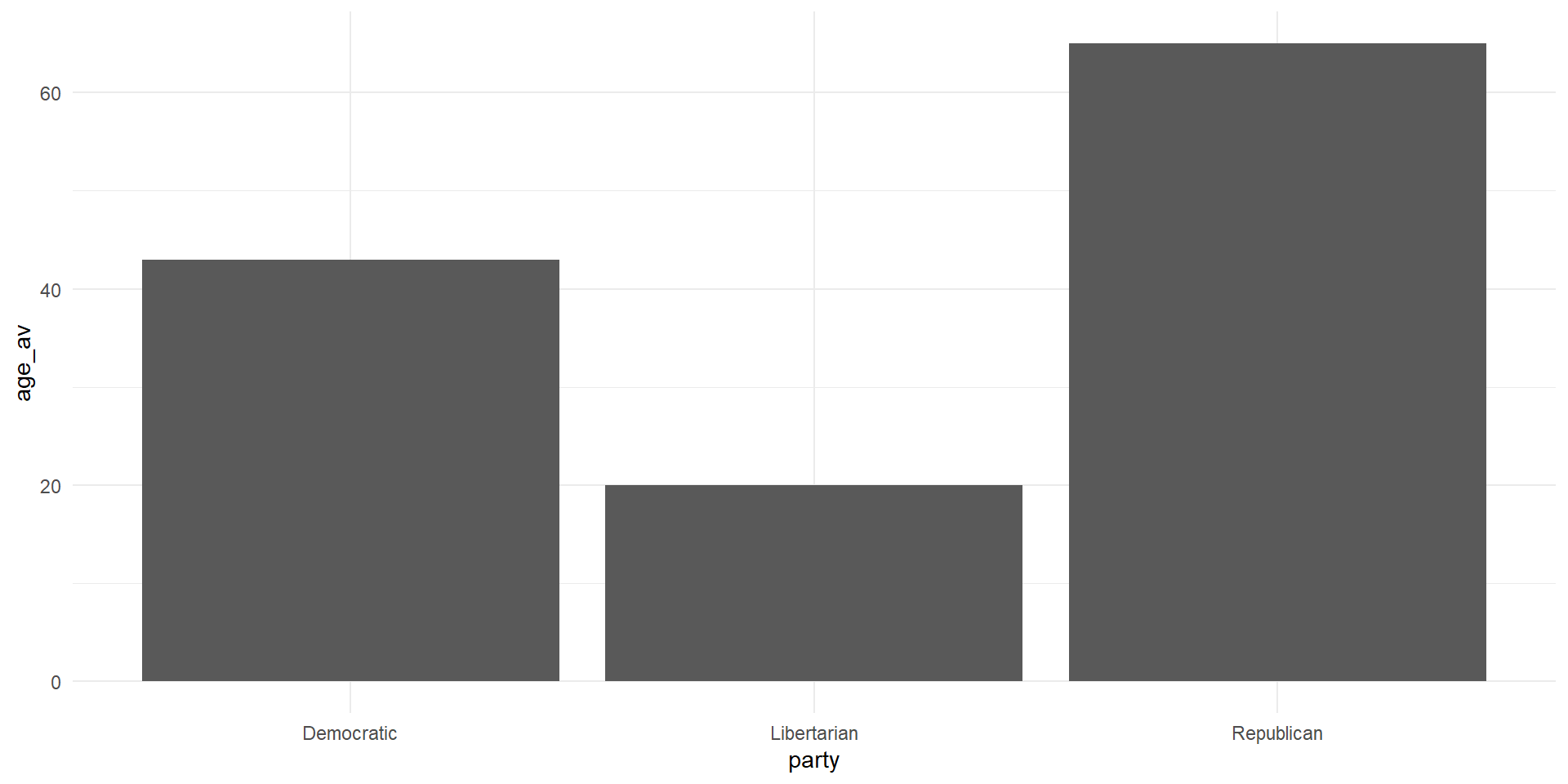
- Note that within
geom_bar()we had to setstatto “identity”
Stucture of ggplot Code
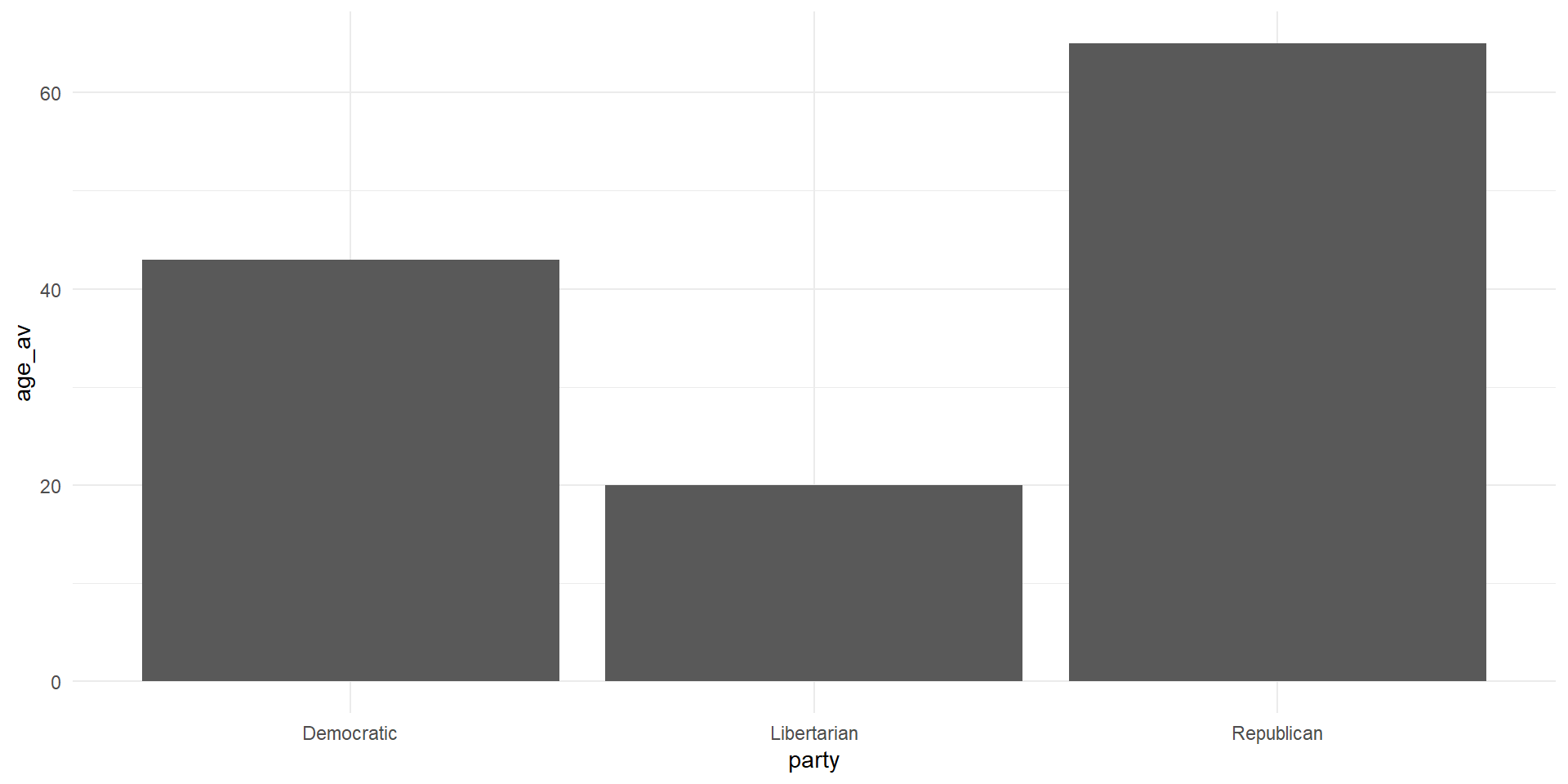
What’re some ways we can make this figure more appealing?
Ways to Improve the Figure
- Change the axis labels to something that makes sense
- Add color to each bar
- Maybe we want a title?
- A caption of where the data is from?
Live Coding 3
Let’s make a pretty picture
Live Coding 3
This section will be a little different. Now that we’re fairly familiar with this data, lets think of some interesting figures we could make!