[1] 4
Let’s get some lunch
FSU
If statementssandwich package for robust standard errorsfunction() functionfunction() to make our own functions in Rfunction()al formfunction() is incredibly flexible()], we put in whatever arguments we’re going to give the function, and then in the brackets ({}) we put what we’re actually doing with the functionif function and else as wellx#Notice how I set some values in the function, that gives it a default of .95
ktw <- function(mod,n_sim = 1000, ci_lvl = .95, tails = 'two'){
mvtnorm::rmvnorm(n_sim,coef(mod),vcov(mod)) -> draws
if(tails == 'two'){
apply(draws, 2, quantile, probs = c((1-ci_lvl)/2,ci_lvl+(1-ci_lvl)/2)) -> ci
}
else
apply(draws, 2, quantile, probs = c(1-ci_lvl,ci_lvl)) -> ci
return(ci)
}
Call:
lm(formula = out_feel ~ tr, data = data)
Residuals:
Min 1Q Median 3Q Max
-13.741 -12.941 -9.741 5.907 87.059
Coefficients:
Estimate Std. Error t value Pr(>|t|)
(Intercept) 12.9415 1.0363 12.488 <2e-16 ***
trpolicy 0.7991 1.4618 0.547 0.585
trpartisan 0.6059 1.4780 0.410 0.682
---
Signif. codes: 0 '***' 0.001 '**' 0.01 '*' 0.05 '.' 0.1 ' ' 1
Residual standard error: 20.54 on 1167 degrees of freedom
Multiple R-squared: 0.0002777, Adjusted R-squared: -0.001436
F-statistic: 0.1621 on 2 and 1167 DF, p-value: 0.8504
ktw <- function(mod,n_sim = 1000, ci_lvl = .95, tails = 'two'){
mvtnorm::rmvnorm(n_sim,coef(mod),vcov(mod)) -> draws
if(tails == 'two'){
apply(draws, 2, quantile, probs = c((1-ci_lvl)/2,ci_lvl+(1-ci_lvl)/2)) -> ci
}
else
apply(draws, 2, quantile, probs = c(1-ci_lvl,ci_lvl)) -> ci
as.data.frame(ci) %>%
pivot_longer(cols = 1:ncol(.),
names_to = 'coef') %>%
mutate(qi = rep(c('lower','upper'), each = 3)) %>%
pivot_wider(names_from = qi, values_from = value) -> ci
return(ci)
}# A tibble: 3 × 3
coef lower upper
<chr> <dbl> <dbl>
1 (Intercept) 10.9 15.0
2 trpolicy -1.96 3.73
3 trpartisan -2.23 3.53
hand_beta() that will give you the by hand regression coefficients for the model from the previous exampleletter_grade() that converts these numbers into a letter grade. Combine both vectors into a table.normalize() that normalizes this variable (i.e., make it have a mean of 0 and standard deviation of 1). Compare the values produced from your function to the values produced from the base R function, scale()summary_stats() that returns a list of summary statistics, the mean, median, variance, and standard deviation. Apply this function to x, y, and a new variable z that follows a beta distribution (use the function rbeta(), and set shape1 to 20 and shape2 to 5)list_ext() to extract items from a list. Store the results from the previous examples in a single list, and try to extract them with your new function.theme_a <- function(){
theme_light()+
theme(legend.position = 'bottom',
legend.text = element_text(size = 20),
legend.title = element_text(size = 22),
panel.grid = element_line(linetype = 2,
color = alpha('lightgray',.6)),
axis.title = element_text(size = 20),
axis.text = element_text(size = 15))
}
theme_b <- function(){
theme_light()+
theme(legend.position = 'bottom',
legend.text = element_text(size = 15),
legend.title = element_text(size = 10),
panel.grid = element_line(linetype = 2,
color = alpha('lightgray',.6)),
axis.title = element_text(size = 10),
axis.text = element_text(size = 12))
}make_coef_plot <- function(data){
data %>%
ggplot(aes(x = median, y = fct_rev(policy_id),
color = fct_rev(v_party), shape = fct_rev(v_party)))+
geom_pointrange(aes(xmin = low, xmax = high),
position = position_dodge(.5), size = .75)+
geom_vline(aes(xintercept = 0), linetype = 2)+
annotate('label', x = .486, y = 10.35, color = '#ff6666',
label = 'Party is Not Given')+
annotate('label', x = .145, y = 9.65, color = 'gray65',
label = 'Out-party')+
annotate('label', x = .08, y = 10.2, color = 'gray55',
label = 'In-party')+
#facet_wrap(vars(v_party))+
labs(x = "Effect of Race on Probability of Expecting Vignette to Adopt Own Party's Position",
y = 'Policy', color = 'Vignette Party')+
xlim(-.3,.6)+
scale_y_discrete(labels = label_wrap_gen(16))+
scale_color_manual(values = c('Not Given' = '#ff6666',
'In-party' = 'gray55',
'Out-party' = 'gray65'))+
scale_shape_manual(values = c('Not Given' = 17,
'In-party' = 19,
'Out-party' = 21))
}SandwichSandwichsandwich package that apply to political science worksandwich to estimate heteroskedastic robust standard errors with vcovHC()vcovCL()vcovBS()
Sandwichcoeftest() function from the lmtest package to get the standard errors for based on the estimation strategy we intend on usingsandwichpid1)##heteroskedastic
vcov_h <- sandwich::vcovHC(fit)
fit_h <- fit_h <- lmtest::coeftest(fit, vcov = vcov_h)
##clustered-robust
vcov_cr <- sandwich::vcovCL(fit, cluster = data$pid1)
fit_cr <- lmtest::coeftest(fit, vcov = vcov_cr)
##bootstrapped
vcov_bs <- sandwich::vcovBS(fit)
fit_bs <- lmtest::coeftest(fit, vcov = vcov_bs)
##bootstrapped by hand
n_sim <- 10000
coefs <- list()
for(i in 1:n_sim){
bs_dat <- slice_sample(data, n = nrow(data), replace = TRUE)
bs_fit <- lm(out_feel ~ tr, data = bs_dat)
coefs[[i]] <- tibble(coef = names(coef(bs_fit)),
est = coef(bs_fit))
}
bind_rows(coefs) %>%
group_by(coef) %>%
reframe(est = quantile(est, probs = c(.025,.975))) %>%
mutate(qi = rep(c('lower','upper'),3)) %>%
pivot_wider(names_from = qi, values_from = est) %>%
mutate(vcov = 'Bootstrap by Hand') %>%
left_join(tibble(est = coef(fit),
coef = names(coef(fit)))) -> bs_ci
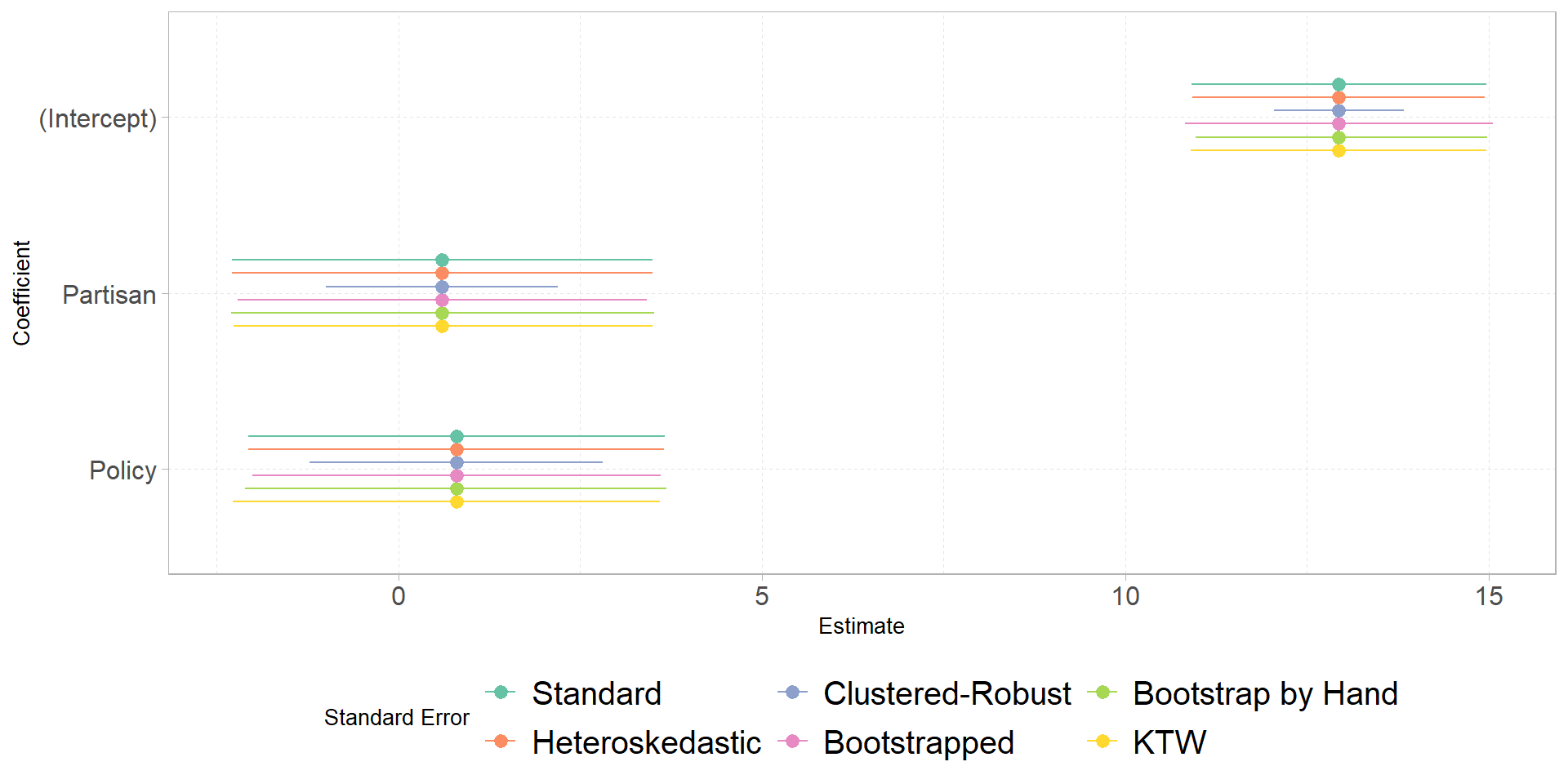
##making a figure to compare
tibble(est = coef(fit), se = fit_h[,2], vcov = 'Heteroskedastic') %>%
bind_rows(tibble(est = coef(fit), se = fit_cr[,2], vcov = 'Clustered-Robust'),
tibble(est = coef(fit), se = lmtest::coeftest(fit)[,2], vcov = 'Standard'),
tibble(est = coef(fit), se = fit_bs[,2], vcov = 'Bootstrapped')) %>%
mutate(coef = rep(row.names(fit_h), times = 4),
lower = est - 1.96*se,
upper = est + 1.96*se) %>%
bind_rows(ktw(fit) %>%
mutate(est = coef(fit),
vcov = 'KTW'),
bs_ci) %>%
mutate(vcov = factor(vcov,
levels = c('Standard',
'Heteroskedastic',
'Clustered-Robust',
'Bootstrapped',
'Bootstrap by Hand',
'KTW')),
coef = str_to_title(str_remove(coef,'tr'))) %>%
ggplot(aes(x = est, y = fct_rev(coef), color = vcov))+
geom_pointrange(aes(xmin = lower, xmax = upper),
position = position_dodge2(.45,
reverse = TRUE))+
labs(color = 'Standard Error',
y = 'Coefficient', x = 'Estimate') +
scale_color_brewer(palette = 'Set2')+
theme_b()
Comments
quartoto produce documents like this, you’ll want to make sure you avoid unnecessary printouts, such as warnings or messages from loaded packages, or just results that do not answer a question (e.g., printing the name of every variable for the dataset used in question 2 when only two of those variables are actually used for the assignment.)#be used for headers, you need a space between the symbol and your titleplot()when you call it